
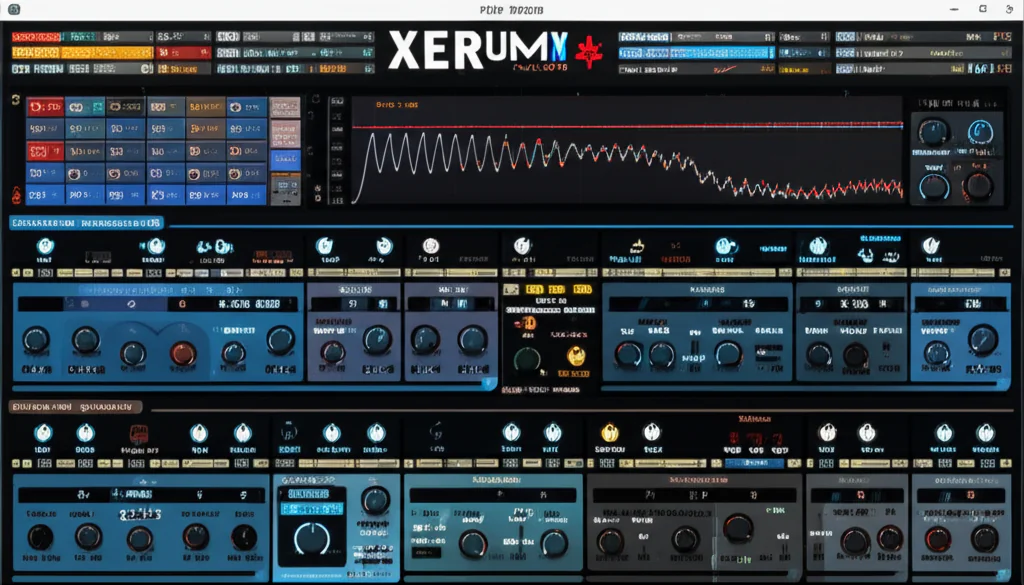

If you’ve ever dabbled in electronic music production, chances are you’ve heard the name Xfer Serum whispered like a secret weapon among top producers. But why does this synth, first unleashed in 2014, still dominate studios and charts in 2025? Spoiler alert: it’s not just nostalgia. From its crystal-clear wavetable engine to its intuitive drag-and-drop modulation, Serum has evolved into a sonic powerhouse that’s as relevant as ever.
At Uniphonic™, we’ve spent countless hours designing sounds, mixing tracks, and pushing Serum to its limits. In this article, we’ll reveal 12 compelling reasons why Serum remains the industry standard, including insider tips on custom wavetable creation, CPU optimization hacks, and a sneak peek at the game-changing Serum 2 upgrade. Curious how this synth can transform your music? Stick around — by the end, you’ll know exactly why Serum deserves a spot in your plugin arsenal.
Key Takeaways
- Xfer Serum offers pristine, alias-free wavetable synthesis with unmatched visual feedback, making sound design both intuitive and inspiring.
- Its drag-and-drop modulation system empowers producers to create dynamic, evolving sounds with ease.
- Serum 2’s multi-engine oscillators and expanded effects push the boundaries of what’s possible in a software synth — and it’s a free upgrade for existing users!
- Versatile across genres, Serum excels in everything from aggressive basses to lush cinematic pads.
- CPU optimization tips help keep your workflow smooth without sacrificing quality.
- Ready to dive in? CHECK PRICE on Xfer Serum:
Plugin Boutique | Splice Rent-to-Own | Xfer Records Official
Table of Contents
- ⚡️ Quick Tips and Facts
- 🚀 The Genesis of a Sonic Revolution: Xfer Serum’s Enduring Legacy
- 🤔 Why Xfer Serum Remains the King of Wavetable Synthesis: A Uniphonic™ Deep Dive
- 🔬 Dissecting the Beast: A Comprehensive Look at Serum’s Core Features
- 🛠️ Advanced Sound Design Techniques with Xfer Serum: Unleash Your Creativity
- 🎵 Serum in the Wild: Real-World Applications and Genre Versatility
- 🚀 Optimizing Your Workflow: Tips for Efficiency and Creative Flow
- ⚠️ Common Pitfalls and Troubleshooting: Keeping Your Production Smooth
- 📊 Xfer Serum’s Technical Specifications: What Your System Needs
- 🎁 Our Top Picks: Essential Xfer Serum Preset Packs and Sound Banks
- ✅ Getting Started with Xfer Serum: Installation, Activation, and Your First Sound
- 🤔 Is Xfer Serum the Right Synthesizer for YOU? A Comparative Analysis
- 🔮 The Future of Xfer Serum: What’s Next for the King?
- 🎉 Conclusion: Our Final Verdict on Xfer Serum
- 🔗 Recommended Links
- ❓ FAQ: Your Burning Questions Answered
- 📚 Reference Links
Alright, let’s get this show on the road! Here at Uniphonic™, we’ve spent countless hours twisting knobs and pushing faders on pretty much every synth under the sun. But there’s one that always seems to find its way back into our sessions, a true desert-island plugin. We’re talking, of course, about the wavetable titan: Xfer Serum.
This isn’t just another review; this is our comprehensive guide, a love letter, and a critical look all rolled into one. We’re going to dissect this beast from head to toe, sharing our personal experiences, pro tips, and maybe a few secret recipes along the way. So, grab your headphones, fire up your DAW, and let’s dive in!
⚡️ Quick Tips and Facts
Just dipping your toes in? Here’s the lowdown on Serum, quick and dirty:
- The Brainchild: Serum was created by Steve Duda, a brilliant programmer and producer known for his work with electronic music titans like deadmau5 and his own company, Xfer Records.
- Wavetable Wizardry: At its core, Serum is a wavetable synthesizer. This means instead of basic shapes like sine or square waves, it uses complex, evolving waveforms called wavetables to generate sound, offering insane flexibility.
- Visual is Vital: One of Serum’s most celebrated features is its real-time visual feedback. You see the waveforms bend, the filters cut, and the LFOs pulse, making sound design intuitive and, dare we say, fun!
- Modulation Master: The drag-and-drop modulation system is a game-changer. Want an LFO to control a filter’s cutoff? Just drag the LFO’s title to the cutoff knob. It’s that simple, yet incredibly powerful.
- It’s a Grower, Not a Show-er (Well, it’s that too): Serum comes packed with over 626 presets and 288 wavetables in its latest version, but its true power lies in creating your own sounds from scratch or importing audio to create unique wavetables.
- CPU Hungry? ✅ Yes, Serum can be demanding on your computer’s processor, especially with high unison counts and complex effects. We’ll cover optimization tips later!
- Industry Standard: From Martin Garrix and Skrillex to Flume and Zedd, the list of pros who use Serum is a testament to its power and versatility.
🚀 The Genesis of a Sonic Revolution: Xfer Serum’s Enduring Legacy
Every legendary piece of gear has an origin story, and Serum’s is one of necessity being the mother of invention. Back in the early 2010s, producer and programmer Steve Duda was frustrated. The available software synths were either powerful but ridiculously complicated, or they just didn’t have the pristine, high-quality sound he was after. He envisioned a “dream synthesizer”: one that was visually engaging, creatively liberating, and sounded absolutely clean, without the aliasing (nasty digital artifacts) that plagued other synths.
Working alongside his Xfer Records collaborator Joel Zimmerman (you might know him as deadmau5), Duda embarked on a mission. After years of meticulous development, Serum was unleashed in 2014, and the music production world was never the same. It wasn’t just another tool; it was a paradigm shift. Producers were no longer just tweaking presets; they were becoming sound designers, thanks to an interface that finally made synthesis feel less like rocket science and more like painting with sound. This deep dive into the Hardware vs Software debate showed just how far digital instruments had come.
🤔 Why Xfer Serum Remains the King of Wavetable Synthesis: A Uniphonic™ Deep Dive
So, with a sea of competitors, you might be asking, “Why is Xfer Serum so popular?” It’s a question we get all the time. Even in 2025, years after its initial release, Serum still holds the throne. Here’s our official Uniphonic™ breakdown of why this synth isn’t just hype—it’s the real deal.
| Feature | Uniphonic™ Rating (1-10) |
|---|---|
| Sound Quality | 10/10 |
| Ease of Use | 9/10 |
| Features & Flexibility | 10/10 |
| Visual Workflow | 10/10 |
| CPU Usage | 7/10 |
| Value | 9/10 |
| Overall | 9.5/10 |
🎨 The Art of Sound: Serum’s Intuitive Visual Workflow
The number one reason producers fall in love with Serum is that you can see everything you’re doing. Forget guessing what a knob is doing to your wave. Serum gives you a gorgeous, real-time oscilloscope view that animates your wavetable as it’s being warped, filtered, and modulated. This visual feedback was a core part of Steve Duda’s original vision, and it’s what makes learning synthesis on Serum so incredibly intuitive. It bridges the gap between the technical and the creative, letting you build a direct connection with your sound.
🎛️ Unparalleled Modulation Capabilities: The Heartbeat of Dynamic Sound
Movement is the key to interesting sounds, and Serum is the undisputed king of modulation. The system is brilliantly simple: see a parameter you want to modulate? Grab an LFO or Envelope and just drag it onto the knob. A little blue arc appears, showing you the modulation depth. Want to fine-tune it? The Mod Matrix gives you a comprehensive overview of all your routings, allowing for incredibly complex and precise control. With the release of Serum 2, you now have up to ten LFOs and four envelopes to play with, opening up a universe of sonic motion.
✨ Pristine Audio Quality and Sonic Clarity
At the end of the day, it all comes down to sound. Serum’s audio engine is renowned for its clarity and precision. The oscillators are calculated with ultra-high precision, meaning you get a clean, crisp sound without unwanted digital noise or aliasing, even at extreme settings. This makes it a perfect canvas; the sounds are pure and punchy, sitting perfectly in a mix whether you’re making aggressive dubstep basses or delicate ambient pads.
Ready to experience the king for yourself?
👉 CHECK PRICE on:
- Xfer Serum: Plugin Boutique | Splice (Rent-to-Own) | Xfer Records Official
🔬 Dissecting the Beast: A Comprehensive Look at Serum’s Core Features
Let’s pop the hood and see what makes this synth tick. Serum is more than just its oscillators; it’s a complete sound design ecosystem.
🌊 The Powerhouse: Wavetable Oscillators and Beyond
The heart of Serum is its dual wavetable oscillators. But with the release of Serum 2, it’s now a five-source powerhouse, including a third primary oscillator, a sub-oscillator, and a versatile noise oscillator.
- Wavetable Oscillators (A, B, and the new third osc): These are your main sound generators. You can choose from hundreds of factory wavetables or, the fun part, import your own audio. Got a cool vocal chop or a drum loop? Drag it in, and Serum will convert it into a unique wavetable you can scan through. The possibilities are literally endless.
- Sub Oscillator: This adds low-end weight and fundamentals to your patch. It’s simple but essential for creating powerful basses and rich leads.
- Noise Oscillator: Don’t let the name fool you. This is a secret weapon. It comes loaded with a huge library of noise types, from classic white noise to organic textures and transients. You can even load your own one-shot samples into it, effectively making it a simple sampler!
Serum 2 pushes this even further, introducing new oscillator types like Granular, Spectral, and Multisample engines, turning it into a true multi-engine monster.
🧰 The Sonic Toolkit: Filters, Effects, and the Mighty Modulation Matrix
A great sound source needs great shaping tools, and Serum delivers in spades.
- The Filters: Serum’s filter section is incredibly versatile. It includes a vast array of types, from classic low-pass and high-pass filters to more exotic ones like comb filters, phasers, and the infamous “Reverb” filter, beloved by Riddim producers. Serum 2 adds a second filter and 11 new types, including classic analog emulations, for even more surgical sound sculpting.
- The FX Rack: This is practically a plugin suite in its own right. You get 10 top-quality effects, including Distortion, Reverb, Delay, EQ, and a Multiband Compressor. You can re-order them however you like, and every single parameter is a modulation destination. Want the distortion amount to increase with velocity? Easy. Want an LFO to pan the delay feedback? Done. Serum 2 expands this with multiple effects buses for even more complex routing.
🎶 Arpeggiator and Sequencer: Rhythmic Innovation at Your Fingertips
The latest versions of Serum have introduced a powerful Arpeggiator and a new CLIP module. This isn’t your grandpa’s simple up-and-down arp. It’s a full-blown step sequencer that lets you program intricate melodic and rhythmic patterns directly inside the synth, which then syncs perfectly to your DAW’s tempo.
🔊 Unison and Hyper: Crafting Massive, Wide Sounds
Want that huge, stereo-filling supersaw sound? Serum’s Unison engine is legendary. You can stack up to 16 voices on a single oscillator, with detailed control over their detuning, stereo width, and wavetable position. This is the secret to creating everything from massive trance leads to thick, wobbly basses. The Hyper/Dimension effect in the FX rack adds another layer of lush stereo widening, perfect for pads and atmospheric textures.
🛠️ Advanced Sound Design Techniques with Xfer Serum: Unleash Your Creativity
Okay, you’ve got the basics down. Now it’s time to really unlock Serum’s potential. These are some of the advanced Music Production Techniques our team at Uniphonic™ uses every day.
✍️ Crafting Your Own Sonic DNA: Custom Wavetable Creation
This is where Serum truly leaves the competition in the dust. Creating your own wavetables is the key to a signature sound. Here are a few ways to do it:
- Import Audio: The simplest method. Drag and drop almost any audio file onto an oscillator. Serum analyzes the audio and slices it into up to 256 individual frames, creating a wavetable. Try it with vocal phrases, foley sounds, or even entire drum loops for wild, rhythmic textures.
- Draw Your Own: Click the pencil icon to open the Wavetable Editor. Here, you can manually draw waveforms using various tools and grid sizes. You can create a few keyframes and then use the “Morph” functions (like Morph – Spectral) to have Serum generate all the frames in between, creating smooth, evolving sounds.
- Resample, Resample, Resample: This is a pro-level secret. Set up a cool patch with lots of modulation and effects. Then, in Serum’s menu, choose “Resample to OSC A” (or B). Serum will record one bar of its own output, turn that into a new wavetable, and load it into the oscillator. It’s a fantastic way to create incredibly complex and organic wavetables that would be impossible to design otherwise.
🎚️ Mastering the FX Rack: Professional Polish and Character
The order of your effects matters. A lot. Here’s a Uniphonic™ go-to chain for a lead sound:
- Distortion: Adds harmonics and grit early on.
- EQ: Shape the new harmonically rich sound. Cut out any mud or harshness created by the distortion.
- Compressor (Multiband or OTT): Tame the dynamics and bring out the details. The built-in OTT preset is a modern classic for a reason.
- Hyper/Dimension: Add stereo width.
- Chorus/Phaser/Flanger: Add movement and character.
- Delay & Reverb: Place these last to create a sense of space without making the core sound muddy.
🔗 Exploring FM and AM Synthesis: Beyond Basic Wavetables
Serum is a fantastic FM synth! In the Warp menu of an oscillator, select “FM (from B)”. Now, Oscillator B will modulate the frequency of Oscillator A. Turn down the level of Osc B in the mixer (so you don’t hear it directly) and play with its shape, pitch, and the FM amount on Osc A. This is the key to classic metallic tones, growling basses, and complex, evolving timbres. You can do the same with AM (Amplitude Modulation) for different flavors of sonic mayhem.
🔄 Resampling and Layering: Complex Soundscapes Made Simple
Don’t be afraid to use multiple instances of Serum. Create a gritty bass layer in one, a wide pad in another, and a sharp pluck in a third. Route them to a group channel in your DAW and process them together. Or, even better, create a sound, bounce it to audio, and then drag that new audio file back into a new instance of Serum to create a wavetable from it. This iterative process of sound design is how you create truly unique and professional-sounding patches.
🎵 Serum in the Wild: Real-World Applications and Genre Versatility
Is Serum just for EDM? ❌ Absolutely not! While it’s true that Serum became a legend in genres like Dubstep, Trap, and Future Bass for its aggressive, cutting basses and pristine leads, its versatility is staggering.
Here at Uniphonic™, we’ve used Serum for:
- Cinematic Scoring: Its ability to create evolving pads, dramatic drones, and custom sound effects from imported audio is a sound designer’s dream.
- Pop & Hip Hop: Clean, punchy plucks, deep 808-style basses (by using a sine wave in the sub-osc and adding a touch of distortion), and modern synth keys are all easily within reach.
- Techno & House: It’s perfect for crafting driving basslines, hypnotic arp sequences, and detailed percussive textures using the noise oscillator.
- Ambient & Lo-Fi: By using organic samples in the noise oscillator, creating slowly evolving pads with long LFOs, and adding some gentle distortion and reverb, Serum can be surprisingly warm and atmospheric.
The list of A-list producers who rely on Serum speaks for itself: Martin Garrix, deadmau5, Skrillex, Zedd, Flume, Marshmello, and Kygo are just a few of the names who have been spotted using this powerhouse synth.
🚀 Optimizing Your Workflow: Tips for Efficiency and Creative Flow
Serum is a beast, but it can sometimes tame your CPU. Here are our top tips for keeping things running smoothly and staying in the creative zone.
- Freeze and Flatten: This is your best friend. Once you’re happy with a Serum track, right-click and “Freeze” (in Ableton Live) or “Render in Place.” This turns the MIDI into an audio file, freeing up massive amounts of CPU. You can always unfreeze it later if you need to make changes.
- Watch the Voices: The biggest CPU hog is the voice count. Do you really need 16 unison voices on that pad? Try dialing it back to 5 or 7. Often, the difference is minimal in a dense mix but huge for your processor.
- Draft Mode: In the Global tab, you can lower the oversampling quality (e.g., from 4x to 2x) while you’re writing. This significantly reduces CPU load. Just remember to turn it back up to 4x for your final render to get the highest audio quality.
- Use Macros: The eight Macro knobs are your key to better Performance Techniques. Instead of automating ten different parameters, map them all to a single Macro knob (like “Filter Sweep” or “Intensity”). This keeps your automation lanes clean and makes your patches more playable and expressive.
- Build a Template: Start your projects with a DAW template that has a few instances of Serum pre-loaded and routed to group channels (Basses, Leads, Pads, etc.). This saves you setup time and lets you jump straight into creating.
⚠️ Common Pitfalls and Troubleshooting: Keeping Your Production Smooth
Even the best of us run into roadblocks. Here are some common Serum issues and how to solve them like a pro.
-
Problem: 😩 “My CPU is on fire! My project is crackling and popping.”
- Solution: ✅ Follow the optimization tips above! Lower your voice count, use Draft mode, and freeze your tracks aggressively. Also, check the “Unison” settings on your Sub and Noise oscillators—it’s easy to accidentally leave them on, eating up voices.
-
Problem: 🤔 “My patch sounds silent or suddenly gets quiet.”
- Solution: ✅ Check your filter! It’s very common to accidentally drag an LFO or envelope to the filter cutoff and modulate it all the way down, effectively silencing the sound. Also, check if you have “KEY” tracking enabled on the filter; a low note might be closing the filter completely.
-
Problem: ❌ “I installed a new preset pack, but I can’t find it in Serum.”
- Solution: ✅ Make sure you placed the preset folder in the correct directory. In Serum’s menu, click “Show Serum Presets folder.” This will open the exact location where Serum looks for presets. Drop your new folder in there and click “Rescan folders on disk” in the same menu.
-
Problem: 😵 “My bass sounds muddy and clashes with my kick.”
- Solution: ✅ This is a mixing issue more than a Serum one, but it’s common. Try sidechaining your bass to your kick drum. Also, use an EQ to carve out space. Cut the low frequencies (around 100Hz) from other instruments to make room for the bass. On the bass itself, try cutting a small notch around 150-250Hz to reduce boxiness.
📊 Xfer Serum’s Technical Specifications: What Your System Needs
Before you dive in, make sure your rig is ready. Here are the official specs for the latest version of Serum.
| Specification | Requirement |
|---|---|
| Operating System | Windows 10+ or macOS High Sierra (or later for Intel) / Big Sur (or later for Apple Silicon) |
| Plugin Formats | VST3, AU, AAX (64-bit only) |
| Host Software | Any 64-bit DAW that supports VST3, AU, or AAX plugins (e.g., Ableton Live, FL Studio, Logic Pro X, Pro Tools) |
| CPU | A CPU with SSE2 support is required. Essentially, any modern processor will work, but a faster CPU is highly recommended for complex patches. |
| RAM | While there’s no official minimum, we recommend at least 8GB of RAM for modern music production, and 16GB or more is ideal. |
🎁 Our Top Picks: Essential Xfer Serum Preset Packs and Sound Banks
While building sounds from scratch is rewarding, sometimes you need instant inspiration. The third-party ecosystem for Serum is MASSIVE. Here are a few trusted brands the Uniphonic™ team turns to when we need quality sounds fast.
- Splice Sounds: This is almost a no-brainer. Splice has an enormous, ever-growing library of presets from world-class sound designers and artists. The ability to search by genre, instrument, and character is a huge time-saver.
- Cymatics: Known for their high-energy packs, Cymatics is a go-to for producers of Trap, Dubstep, and Future Bass. Their presets are often mix-ready and pack a serious punch.
- Black Octopus Sound: If you’re looking for something more organic or cinematic, check out Black Octopus. They offer incredibly detailed and expressive presets, often created by renowned artists like Trifonic and Leviathan.
- Loopmasters: A massive marketplace for all things sound-related, Loopmasters has a huge collection of Serum preset packs covering virtually every genre imaginable, from Power House to Synthwave.
👉 Shop Serum Presets on:
- Splice: Search for Serum Presets
- Loopmasters: Search for Serum Presets
- Plugin Boutique: Search for Serum Presets
For those who also use other platforms, you might find our collection of Reason Sounds a source of fresh inspiration.
✅ Getting Started with Xfer Serum: Installation, Activation, and Your First Sound
Ready to join the club? Getting Serum up and running is a breeze.
- Purchase & Download: Head over to the Xfer Records website to buy your license. Alternatively, you can use the fantastic Rent-to-Own plan from Splice, which lets you pay a small monthly fee until you own it outright. This is an incredible option for producers on a budget.
- Installation: Run the installer you downloaded. It will ask you where to install the VST/AU/AAX plugin files. Make sure this location is one that your DAW scans for plugins.
- Activation: The first time you open Serum in your DAW, it will ask for the serial number you received via email. Copy and paste it in, and you’re good to go!
- Load Your First Sound: In your DAW, create a new MIDI track and load Serum as an instrument. It will open with the “Init – Saw” patch. Play a few notes on your MIDI keyboard. Congratulations, you’re making sound with Serum!
- Explore: Click the preset name to open the browser. Navigate through the folders and try out some of the factory presets to get a feel for what the synth can do.
For a great visual walkthrough of what Serum can do right out of the box, the first YouTube video we’ve featured, titled ‘Xfer Records SERUM – SOUNDTEST’ by SoundSource, is a fantastic starting point. You can jump to it here: #featured-video.
🤔 Is Xfer Serum the Right Synthesizer for YOU? A Comparative Analysis
Serum is a titan, but it’s not the only synth in the game. Its two biggest modern rivals are Arturia Pigments and the free-to-start Vital Audio Vital. So, how do they stack up? This is a core debate in the Hardware vs Software world.
| Feature | Xfer Serum | Arturia Pigments | Vital Audio Vital |
|---|---|---|---|
| Primary Synthesis | Wavetable, FM, AM, Sample, Granular, Spectral | Wavetable, Virtual Analog, Sample, Granular, Harmonic | Wavetable, Sample |
| Workflow Vibe | Fast, precise, surgical. A sound designer’s dream. | Visual, experimental, modular-inspired. | Minimalist, fast, and incredibly powerful for a free synth. |
| Key Strength | Pristine sound quality, custom wavetable creation, and an unbeatable punchy character. | Insane modulation possibilities, multiple synth engines, and beautiful visual feedback. | It’s FREE! And its spectral wavetable warping is unique and powerful. |
| Best For… | Producers who want a clean, powerful, and endlessly deep synth for modern electronic and pop music. | Sound designers who love to experiment and want a synth that can do almost everything. | Anyone on a budget, or producers who want a synth that’s very similar to Serum without the cost. |
The Uniphonic™ Verdict:
- Choose Serum if you want the industry-standard tool with the cleanest, most powerful sound for cutting-edge genres.
- Choose Pigments if you value visual creativity, love complex modulation, and want multiple synthesis types in one plugin.
- Download Vital no matter what! It’s an incredible synth, and you can’t beat the price. It’s the perfect companion to Serum or a fantastic starting point on its own.
🔮 The Future of Xfer Serum: What’s Next for the King?
For years, the community whispered and waited. And then, it happened. Xfer Records announced Serum 2. This isn’t just a minor update; it’s a massive evolution that solidifies Serum’s reign for the next decade.
So what’s new in Serum 2?
- A Multi-Engine Powerhouse: The biggest news is the expansion beyond wavetables. Serum 2 introduces new oscillator types including Multisample, Sample, Granular, and Spectral synthesis. This “blasts the sonic palette wide-open,” allowing for everything from realistic instrument sounds to mind-bending textures.
- More of Everything: You get a third main oscillator, a second filter, more LFOs (up to 10), more envelopes (up to 4), and more macros (up to 8).
- Enhanced Workflow: A new CLIP module for sequencing, more flexible effects routing with multiple buses, and a refined UI make the synth even more powerful and intuitive.
And the best part? In a move that shows incredible respect for its user base, Serum 2 is a completely free upgrade for all existing Serum 1 owners. This commitment to “lifetime free updates” is almost unheard of and is a major reason why we at Uniphonic™ have so much respect for Steve Duda and the Xfer Records team.
🎉 Conclusion: Our Final Verdict on Xfer Serum

After an exhaustive journey through the sonic landscape of Xfer Serum, what can we say? This synth is nothing short of a masterpiece — a true game-changer in the world of wavetable synthesis. From its crystal-clear audio engine and intuitive visual workflow to its mind-boggling modulation capabilities and expansive feature set, Serum has earned its place as the go-to synth for producers and sound designers worldwide.
Positives ✅
- Unmatched sound quality: Ultra-clean oscillators with zero aliasing.
- Visual feedback: Real-time waveform display makes sound design intuitive.
- Modulation freedom: Drag-and-drop modulation and a powerful matrix.
- Custom wavetable creation: Import audio, draw, morph, and resample.
- Versatile FX rack: High-quality effects with flexible routing.
- Genre versatility: From EDM bangers to cinematic soundscapes.
- Serum 2 upgrade: Massive new features and engines, free for existing users.
Negatives ❌
- CPU usage: Can be demanding, especially with high unison and effects.
- Learning curve: While intuitive, mastering advanced features takes time.
- Price: Not the cheapest synth, though the value justifies the cost.
Our Recommendation
If you’re serious about music production and sound design, Xfer Serum is a must-have. It strikes the perfect balance between power and usability, making it suitable for beginners willing to learn and seasoned pros alike. The free Serum 2 upgrade is the cherry on top, future-proofing your investment.
Wondering if Serum is right for you? If you crave pristine sound quality, deep modulation, and an inspiring interface that sparks creativity, this synth will not disappoint. And if you’re still on the fence, remember: the best way to find out is to try it yourself — and with options like Splice’s rent-to-own plan, there’s never been a better time.
🔗 Recommended Links
👉 Shop Xfer Serum and Presets:
-
Xfer Serum Synthesizer:
-
Serum Preset Packs:
Books for Deeper Synthesis and Sound Design Knowledge:
-
“The Synthesizer: A Comprehensive Guide to Understanding, Programming, Playing, and Recording the Ultimate Electronic Music Instrument” by Mark Vail
Amazon Link -
“Sound Design: The Expressive Power of Music, Voice and Sound Effects in Cinema” by David Sonnenschein
Amazon Link -
“Electronic Music and Sound Design – Theory and Practice with Max/MSP – Volume 1” by Alessandro Cipriani and Maurizio Giri
Amazon Link
❓ FAQ: Your Burning Questions Answered

What is Xfer Serum and how does it work in music production?
Xfer Serum is a wavetable synthesizer plugin designed for digital audio workstations (DAWs) on Windows and macOS. It generates sound by scanning through complex waveforms called wavetables, which can be imported, drawn, or created from audio samples. Serum’s real-time visual feedback and drag-and-drop modulation system make it intuitive for producers to sculpt dynamic, evolving sounds. It’s widely used in electronic music production, sound design, and even cinematic scoring due to its versatility and pristine sound quality.
Read more about “Serum Free Secrets: 7 Must-Know Facts & Tips for 2025 🎧🧬”
How do I use Xfer Serum to create unique sounds and presets for my tracks?
Creating unique sounds in Serum involves several key steps:
- Start with an Init Patch: Begin with a blank slate to understand the core sound.
- Choose or Import Wavetables: Use factory wavetables or drag in your own audio files to create custom waveforms.
- Modulate Parameters: Use Serum’s drag-and-drop modulation to assign LFOs, envelopes, or macros to control oscillators, filters, and effects dynamically.
- Shape with Filters and Effects: Apply filters and tweak the FX rack to add character, space, and polish.
- Resample and Layer: Bounce your sounds and import them back into Serum for complex textures.
- Save Your Preset: Once satisfied, save your patch for future use or sharing.
This workflow allows you to craft anything from aggressive basses to lush pads, giving your tracks a unique sonic fingerprint.
What are the key features and advantages of using Xfer Serum in sound design and music production?
Serum’s standout features include:
- High-Quality Oscillators: Ultra-clean wavetable synthesis with zero aliasing.
- Visual Interface: Real-time waveform display for intuitive editing.
- Drag-and-Drop Modulation: Simplifies complex modulation routings.
- Custom Wavetable Creation: Import, draw, morph, and resample wavetables.
- Extensive FX Rack: Includes distortion, reverb, delay, EQ, and more.
- Advanced Arpeggiator and Sequencer: For rhythmic and melodic pattern creation.
- Multi-Engine Oscillators (Serum 2): Adds granular, spectral, and multisample synthesis.
- Cross-Platform Compatibility: Works in all major DAWs supporting VST3, AU, and AAX.
These features empower producers to create professional-grade sounds with efficiency and creative freedom.
Can I use Xfer Serum to recreate popular synth sounds and how do I go about doing so?
Absolutely! Serum’s flexibility makes it ideal for recreating iconic synth sounds from various genres. Here’s how:
- Analyze the Original Sound: Identify the waveform type, modulation, and effects used.
- Start with Similar Wavetables: Use Serum’s factory wavetables or import samples that match the character.
- Match Modulation: Use envelopes and LFOs to mimic filter sweeps, vibrato, or rhythmic gating.
- Apply Effects: Use distortion, delay, and reverb to replicate the sonic texture.
- Fine-Tune Parameters: Adjust unison, detune, and filter resonance to get closer to the original.
Many producers share recreations of famous sounds online, which can be a helpful learning tool. Serum’s visual feedback makes this process more accessible than ever.
How can I optimize Serum’s performance to avoid CPU overload during production?
Serum can be CPU-intensive, especially with high unison voices and complex effects. To optimize:
- Reduce Unison Voices: Lower from 16 to 5-7 where possible.
- Use Draft Mode: Temporarily lower oversampling during sound design.
- Freeze or Render Tracks: Convert MIDI to audio in your DAW to save CPU.
- Limit Effects Usage: Use only necessary effects and disable unused oscillators.
- Use Macros for Automation: Simplify automation lanes to reduce processing overhead.
Following these tips helps maintain smooth workflow without sacrificing sound quality.
What platforms and DAWs support Xfer Serum?
Serum supports all major DAWs on Windows and macOS that accept VST3, AU, or AAX plugins, including:
- Ableton Live
- FL Studio
- Logic Pro X
- Pro Tools
- Cubase
- Studio One
- Bitwig Studio
This broad compatibility makes Serum accessible to virtually every producer.
Read more about “Is Serum VST Free? 🎹 10 Best Alternatives & Truth (2025)”
📚 Reference Links
- Xfer Records Official Website – Serum
- Xfer Records Serum 2 Product Page
- Splice – Serum 2 Plugin
- Plugin Boutique – Serum Synth
- Ableton Live
- FL Studio
- Logic Pro X
- Loopmasters – Serum Presets
- Splice Sounds
- Cymatics
- Black Octopus Sound
For more expert insights on music production and plugin recommendations, visit Uniphonic™ Plugin Recommendations.